


What Is a Two-Size Band System for Apple Watch?
The two-size band system pairs one of two connector groups (small or large) with a band length (S/M or M/L). Check the connector group first, then pick the length that matches your wrist measurement. That’s the whole concept. Once you know your watch’s connector group, you’re shopping from a much smaller, much more accurate pool of bands, and once you know your wrist measurement, you’re picking the correct length inside that pool.
Here’s the quick path to a correct order:
- Step 1: Identify your Apple Watch case size (check Settings > General > About, or the model number on the case back).
- Step 2: Match that case size to a connector group, small or large.
- Step 3: Measure your wrist in millimeters.
- Step 4: Choose S/M or M/L based on that measurement, not on guesswork.
Skip any of those steps and you risk a band that clips onto the wrong lugs or one that fits the case but not your wrist.
Key Takeaways
Getting a compatible, comfortable Apple Watch band comes down to two separate checks: connector group first, then wrist-length sizing, done independently and in that order.
| Point | Details |
|---|---|
| Two systems, not one | Connector group (small or large) determines physical fit; wrist length (S/M or M/L) determines comfort. |
| Confirm your connector group | Check your model number against Apple’s support page rather than trusting a bare case-size label. |
| Boundary measurements need flexibility | Choose adjustable or link-removal bands when your wrist falls near an S/M or M/L cutoff. |
| Material dictates precision | Metal link bands require exact adjustment; silicone and nylon tolerate a few millimeters of slack. |
| WizeBand simplifies both checks | WizeBand bands span Series 4 to 10, SE, and Ultra 2 with two size groups and a dedicated sizing tool at checkout. |
Table of Contents
- How Do the Two Connector Groups Work?
- What Do S/M and M/L Actually Mean?
- What About the Apple Watch Ultra and Other Edge Cases?
- Does Band Material Change How Sizing Works?
- How Do You Measure Your Wrist for the Right Band Length?
- How WizeBand Applies the Two-Size System
- A Quick Note on Getting the Fit Right
- Get the Right Fit With WizeBand’s Bundles and Sizing Tools
- Sources
How Do the Two Connector Groups Work?
Apple didn’t design a different band mount for every case size it ever released. Instead, it standardized on two connector groups so that one band can serve multiple Apple Watch generations at once. That’s the entire reason a band bought in 2019 can still clip onto a case sold in 2026.
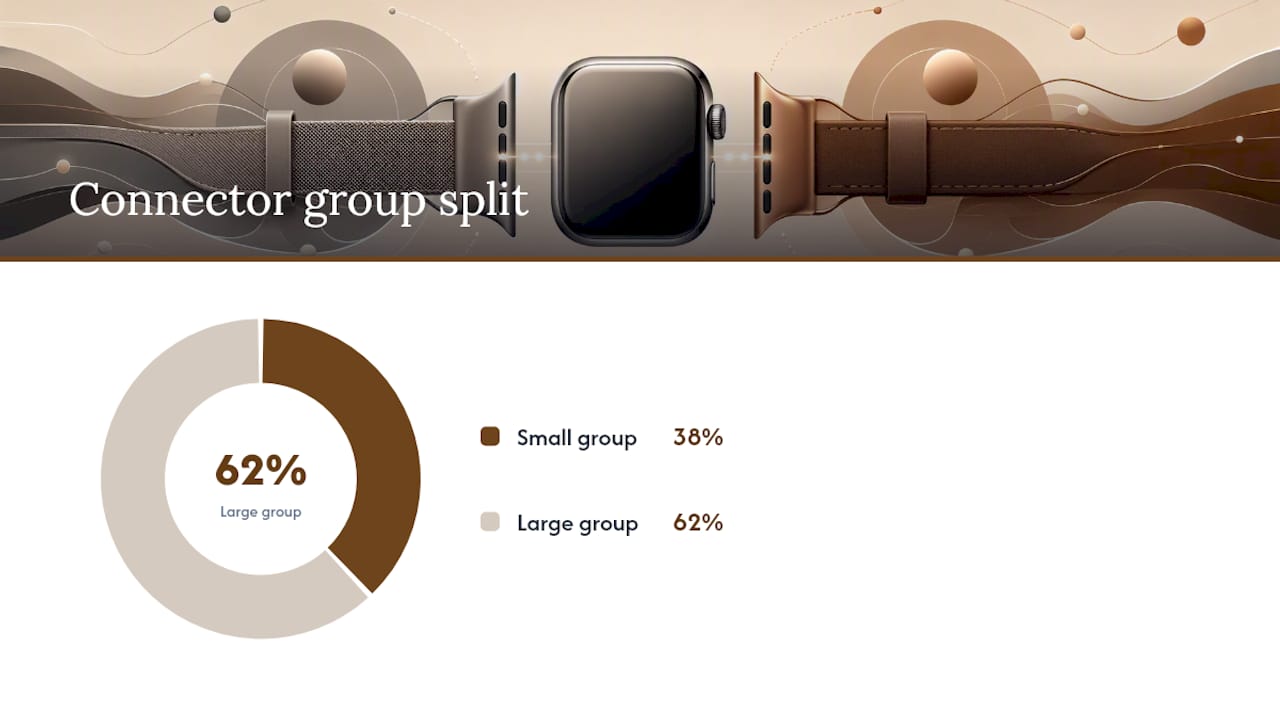
A connector group refers to the physical width and shape of the lug slot where a band attaches to the case. Get the group right, and a band snaps in regardless of which Series it came bundled with originally.
The small connector group generally covers the 38mm, 40mm, and 41mm cases. The large connector group covers 42mm, 44mm, 45mm, and 46mm cases, plus the 49mm Apple Watch Ultra. According to WizeBand’s compatibility guide, most bands are built for one of these two groups rather than for a single case size, which is exactly why a 40mm band from an old Series 5 still works on a current 41mm case.
Where it gets confusing is the 42mm label. Older Apple Watch models (Series 0 through Series 3) used a 42mm case that belongs to the large connector group. But Apple Watch Series 10 also references 42mm in some sizing charts, and depending on the source, that can get grouped differently. Independent sizing guides recommend confirming with your exact model number rather than trusting a bare “42mm” label, since the number alone doesn’t tell you which connector group you’re in.
A few practical notes worth keeping straight:
- Small group: 38mm, 40mm, 41mm.
- Large group: 42mm (legacy models), 44mm, 45mm, 46mm, 49mm (Ultra).
- When in doubt, check your model number against Apple’s official support page rather than relying on the case size alone.
- Product pages that list “fits 41mm/40mm/38mm” or “fits 46mm/45mm/44mm/42mm” are telling you the connector group directly, which is more useful than the model name.
Reading product descriptions this way turns band shopping into a two-minute task instead of a guessing game. You’re not hunting for “a band for my exact watch.” You’re hunting for “a band for my connector group,” and that opens up a far wider set of options, including bands made for models you don’t even own.
What Do S/M and M/L Actually Mean?
Connector group tells you what will physically attach to your case. Wrist length tells you whether the band will actually sit comfortably once it’s on. These are two separate decisions, and mixing them up is the single most common sizing mistake Apple Watch owners make.

S/M and M/L describe the total wearable length of the band, measured in millimeters, not the case size and not the connector group. A band can be built for the large connector group and still come in both S/M and M/L lengths, because a 46mm Apple Watch owner might have a small wrist or a large one.
Published examples vary by band and material, but Intego’s sizing guide cites S/M options fitting wrists in a smaller to medium range and M/L options fitting medium to larger wrist sizes, with exact lengths varying by specific band. Those numbers aren’t universal. Every band model publishes its own chart, and a nylon loop will flex differently than a stainless steel link band even at the same nominal length.
A few things to keep in mind when reading these charts:
- Treat published ranges as a starting point, not a guarantee, and check the specific product page for exact figures.
- If your wrist measurement lands right at the boundary between S/M and M/L, lean toward the size with more adjustability rather than the one that looks closest on paper.
- Metal link bands with removable links give you more flexibility at a boundary measurement than a fixed-length silicone band does.
- When a band offers only one length option, confirm the manufacturer’s clearance range before assuming it will fit.
If you’re stuck exactly between the two, adjustable bands solve the problem instantly. A metal band with a quick-adjust clasp or removable links can be fine-tuned in millimeter increments, which a molded silicone band simply can’t do.
What About the Apple Watch Ultra and Other Edge Cases?
Most bands fit cleanly into the two-group system, but a handful of situations trip people up. The Apple Watch Ultra and Ultra 2, at 49mm, use the large connector group, so nearly any band rated for 44/45/46mm will also work on the Ultra. Some product listings spell this out explicitly as “44/45/46/49mm compatible,” which is worth looking for if you own an Ultra and want more style options beyond Apple’s own strap lineup.
Series 10’s 42mm case is the trickiest overlap in the current lineup. It shares a name with the legacy 42mm case from years ago, but the two don’t automatically belong to the same connector group in every listing. Confirming your exact model number against Apple’s support documentation before ordering avoids a return.
Solo Loop and Braided Solo Loop bands add another wrinkle. Unlike traditional bands, they have no clasp or buckle at all. They’re sized in numbered increments (roughly 1 through 12) rather than S/M and M/L, so Apple’s usual wrist chart doesn’t apply, and you generally need a different measuring approach for those specific styles.
Once a band is attached, “it fits” and “it is secure” are not the same claim. Use this quick checklist every time you put on a new band:
- Listen for an audible click when the connector locks into the lug slot.
- Check for lateral play by gently rocking the case side to side; there should be none.
- Confirm the watch doesn’t rotate freely around your wrist once the clasp is closed.
- Look at the back sensor placement and make sure it sits flush against your skin without gaps.
Pro Tip: If your watch clicks into place but still wiggles slightly when you tap the screen, the connector fit is fine but the band length is wrong, not the other way around. Tighten the closure before assuming you need a different band.
Does Band Material Change How Sizing Works?
Material changes how forgiving a band is, which changes how much precision your sizing decision actually needs. Elastic materials like silicone and woven Sport Loop fabric flex a few millimeters in either direction without any real consequence, which is why Apple’s own sport bands ship in only two or three broad size options and still fit most wrists reasonably well.
Metal link bands behave completely differently. Stainless steel doesn’t stretch, so a band that’s even one link too long will slide around and rotate on your wrist, while one that’s too short will pinch. That’s why quick-adjust and removable-link systems matter so much more for metal bands than for silicone ones. Instead of hoping a fixed length matches your wrist, you remove or add individual links until it does.
A few practical patterns worth knowing:
- Silicone and rubber bands: forgiving, minimal sizing precision needed.
- Nylon and woven loops: moderately forgiving, adjustable within a range via hook-and-loop or magnetic closures.
- Metal link bands: unforgiving, require exact link count for comfort, which is why a proper link-removal tool is worth having on hand.
- Butterfly and jewelry clasps: precise and secure once adjusted, but need that initial adjustment done correctly.
Comfort and sensor accuracy both depend on getting this right. A band that’s too loose lets the case shift during workouts, which can throw off heart-rate readings, while one that’s too tight can leave marks or restrict circulation over a full day of wear. Neither extreme is something you want with a band you’re planning to wear daily.
How Do You Measure Your Wrist for the Right Band Length?
You don’t need a jeweler’s tools to get this right. A soft tape measure works best, but a strip of paper and a ruler does the job just as well if that’s what you have on hand.
- Wrap the tape measure (or paper strip) around your wrist just below the wrist bone, where you’d normally wear a watch.
- Note the measurement in millimeters rather than inches, since nearly every sizing chart uses millimeters.
- Add roughly 5 to 10mm of clearance to your raw measurement. This range gives the band room to move without leaving marks, based on general sizing guidance for wearable bands.
- Compare your adjusted number against the specific band’s published S/M or M/L range rather than a generic chart, since ranges vary by model.
- If your number sits within 5mm of a size boundary, choose a band with removable links or a quick-adjust clasp instead of a fixed length.
Roughly a third of returns on adjustable bands trace back to skipping that clearance step and measuring wrist size too tightly. Give yourself that breathing room up front and you avoid a second order.
WizeBand’s own sizing and compatibility page walks through this same process with model-specific charts, and pairs it with a band link removal tool for anyone who lands between sizes on a metal band. If your measurement falls close to a boundary, ordering the size with more adjustment room and trimming down is almost always easier than trying to stretch a band that’s too short.
How WizeBand Applies the Two-Size System
Every WizeBand strap is built to work across Apple Watch Series 4 through 10, SE, and Ultra 2, using the same small and large connector group logic covered above. Instead of forcing customers to hunt for their exact Series number, checkout is organized around the two size groups directly.
That structure shows up in a few practical ways:
- The Watch Band Sizing Tool walks you through connector group and wrist length before you add a band to your cart.
- Quick-adjust clasps and removable links, covered in more detail in WizeBand’s fit guide, let you fine-tune metal bands without a jeweler.
- Bands built with these systems reduce the odds of ordering a fixed length that’s slightly too tight or too loose for a borderline wrist measurement.
Clear link-removal instructions and an actual sizing tool cut down on guesswork at the exact moment it matters most, before checkout rather than after a box arrives.
A Quick Note on Getting the Fit Right
Helping people size premium metal bands correctly comes down to solving the same handful of problems over and over: someone’s wrist falls between two published ranges, or they’re not sure which connector group their case belongs to. The fix is rarely complicated. It’s almost always a matter of measuring properly and giving yourself an adjustable option instead of committing to a fixed length on a guess.
Metal bands intimidate people because they can’t be stretched like silicone. That’s exactly why a link-removal tool and a clear return policy matter more for a stainless steel band than for anything elastic.
— John
Get the Right Fit With WizeBand’s Bundles and Sizing Tools
Picking the right band shouldn’t take three return shipments to get right. WizeBand builds every band around the same two-size system this article just walked through, so once you know your connector group and wrist length, you’re choosing a finish, not gambling on fit.
The lineup includes classic metal straps, quadruple-chain feminine styles, and luxury butterfly-clasp bands, all offered in Silver Gold, Starlight, Rose Gold, and Gold finishes, with flattering dress options for apple shape to complement your style at formal events. Every band ships with the two size groups already built in, so you order based on your connector group and wrist measurement rather than a confusing list of model numbers. First-time buyers often start with the WizeBand Essentials Bundle or the WizeBand Starter Kit, both of which pair a premium band with sizing support so you’re not adjusting links blind. If you already know you want a specific look, the Gaia Metal Strap and Tokyo Metal Strap both use quick-adjust link systems built for exactly the borderline-wrist scenarios covered above. Measure your wrist, check your connector group, and pick your bundle from there.
Sources
- Change your Apple Watch band (Apple Support)
- Apple Watch Band Sizes Explained: How Compatibility Really Works (WatchPlaza)
- Apple Watch Bands: Complete Guide to Sizes, Styles & Types (Intego)
Recommended
From the blog
View all


Leave a comment